
GrowthStack Advisory / Cold Email Deliverability
Cold email deliverability checklist: 30 checks, in the order to run them
The short answer
To keep cold email out of spam, fix the infrastructure before the copy. Send from separate domains, never your main one. Authenticate every sending domain with SPF, DKIM and DMARC, aligned with the From address. Warm new mailboxes for several weeks, keep the volume on each one low and scale by adding mailboxes. Verify every list before it is sent to, write short plain-text emails, and check the spam rate in Google Postmaster Tools every week, keeping it under 0.1% (Gmail’s hard limit is 0.3%). Outlook.com now rejects non-compliant bulk mail outright; Gmail and Yahoo may filter it or not deliver it. The 30 checks below run in that order.
- Never send cold outbound from your primary domain
- SPF, DKIM, DMARC and a custom tracking domain are non negotiable
- Scale by adding mailboxes, never by raising volume on one
- Engagement is now a filter signal, so targeting and messaging are deliverability work
Great messaging that never reaches the inbox performs exactly as badly as terrible messaging. Deliverability is infrastructure, and it is fixable.

Founder, GrowthStack Advisory. 10+ years building SDR and GTM systems at Locus, GoComet, and Landmark Group. LinkedIn.
· Updated · 12 min read
The cold email deliverability checklist
Thirty checks in six groups, in the order to work through them. A failure early in the list makes everything after it unreliable, so do not skip ahead to copy.
Domains
- Separate sending domains. Never send cold email from your main domain. Complaints are a cost of the channel, and they should land on a domain you can replace.
- More than one domain. Spread mailboxes across several, so a problem on one does not stop the programme.
- Close, properly registered names. Spelled close to your main domain so recipients recognise you, and registered through a normal registrar.
- Time to warm, not just to configure. A new domain and mailbox need weeks before campaign volume. Plan the launch date around that.
Authentication
- SPF on every sending domain. One SPF record per domain, listing every service that sends for it. Microsoft notes that more than 10 DNS lookups can make SPF fail.
- DKIM signing on. Enabled in Google Workspace or Microsoft 365 for each domain, and in any sending tool that relays mail.
- DMARC published. At least
p=none, with a reporting address (rua) so you receive aggregate reports. Gmail, Yahoo and Outlook all require it for bulk senders. - From address aligned. The domain in the From header must match the SPF or DKIM domain. Check it for every tool that sends as you.
- Forward and reverse DNS, and TLS. Gmail and Yahoo require valid DNS records for sending IPs, and Gmail requires TLS. Workspace and Microsoft 365 handle both; self-hosted sending does not.
- Custom tracking domain. If your tool tracks links, use your own tracking domain so you do not share another sender’s reputation.
Mailboxes and volume
- Licensed business mailboxes. Google Workspace or Microsoft 365, on domains you control and pay for in your own name.
- Six to eight mailboxes to start. Across more than one domain. The count is your needed volume divided by a conservative per-mailbox rate, not a target.
- Warm-up before campaigns. Several weeks of gradually increasing, engaged sending before a mailbox carries campaign volume.
- Scale by adding mailboxes. Never by raising volume on one. Volume per mailbox is the most common self-inflicted deliverability problem.
- A real From and Reply-To. Both must be valid addresses on the sending domain that can receive replies, which Microsoft recommends for high-volume senders.
The list
- Verify every list. Before it enters a sequence, not once a quarter. Bounces damage a new domain faster than anything else.
- Remove catch-all domains you cannot confirm. They accept everything at first and bounce later.
- A suppression list. Opt-outs, existing customers and open opportunities, applied to every list automatically.
- Re-verify old data. A list not verified in the last three months should be treated as unverified. Microsoft recommends cleaning lists monthly or quarterly.
- Target before you send. A precise ICP produces fewer complaints. Spam reports are a targeting signal as much as a content one.
Content
- Plain text. No images and no attachments in a first message.
- One link at most in the first touch. And none if the email works without it.
- Accurate subject lines. No fake reply or forward prefixes, and no deceptive headers.
- An easy way to opt out. A clear line or link, honoured quickly. Yahoo asks bulk senders to honour unsubscribes within 2 days and to support one-click unsubscribe (RFC 8058). Add the header if your tool supports it.
- Write for replies. Specific to the recipient and short enough to answer. Mailbox providers read engagement, so reply rate is a deliverability input.
Monitoring
- Google Postmaster Tools on every sending domain. Check the spam rate weekly. Google asks for below 0.3%, ideally below 0.1%.
- Read your DMARC reports. Aggregate reports show which services send as your domain and whether they pass alignment.
- Bounce and reply rate per mailbox, weekly. Per mailbox, not per campaign, so a failing mailbox is visible on its own.
- Ignore open rate. Apple Mail Privacy Protection has pre-fetched images since September 2021, so opens no longer measure reading.
- Rest and rotate. Pull any mailbox that degrades, let it recover, and move DMARC from
nonetoquarantinetorejectgradually once every legitimate sender is aligned, as Microsoft advises.
Why do you need a separate cold email domain?
Never run cold outbound from your primary domain. Buy lookalike domains, set them up properly, and keep your main domain reserved for existing customers and inbound conversation. One bad campaign should never threaten your company email.
How do you set up SPF, DKIM and DMARC for cold email?
- SPF authorises which servers may send for your domain
- DKIM signs your mail so receivers can verify it was not altered
- DMARC tells receivers what to do when the first two fail
- Custom tracking domain so link tracking does not inherit a shared reputation
Missing any of these makes the rest of your effort close to irrelevant.
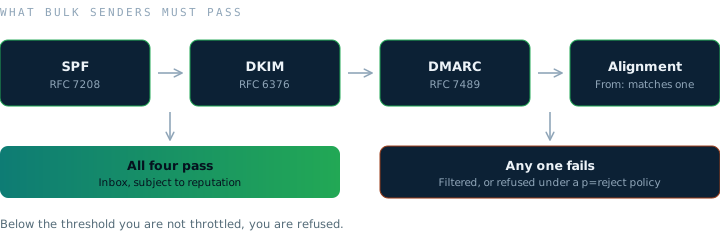
This stopped being optional. Since 1 February 2024, Google requires bulk senders of 5,000 or more messages a day to Gmail to authenticate with SPF and DKIM, publish a DMARC record (an enforcement policy of none is accepted), align the From: header domain with either the SPF or DKIM domain, and keep the spam rate reported in Postmaster Tools below 0.30% (Google). Marketing and subscription mail must also carry one-click unsubscribe. Below those thresholds you are not throttled, you are filtered.
What do Gmail, Yahoo and Outlook require from bulk senders?
All three major providers publish their requirements. Below the stated thresholds you are filtered or refused outright, regardless of how good the copy is.
| Provider | Applies to | Requires | If you fail |
|---|---|---|---|
| Gmail | 5,000+ messages a day, from 1 February 2024 | SPF and DKIM, a DMARC record (p=none accepted), From: aligned with SPF or DKIM, valid forward and reverse DNS, TLS, one-click unsubscribe on marketing mail, spam rate below 0.3% (ideally 0.1%) | Mail may not be delivered, or may be marked as spam |
| Yahoo | Bulk senders, from February 2024 | SPF and DKIM, DMARC at least p=none and passing, From: aligned, one-click unsubscribe (RFC 8058 POST recommended) honoured within 2 days, spam rate below 0.3% | Delivery at risk once requirements or the complaint limit are missed |
| Outlook.com | 5,000+ messages a day to consumer domains, from 5 May 2025 | SPF, DKIM and DMARC at minimum p=none, aligned with SPF or DKIM, valid and reachable From: or Reply-To: | Rejected with 550 5.7.515 |
Two things follow from that table. The bar is now the same everywhere, so there is no provider you can afford to configure for and no provider you can ignore. And Microsoft's move from filtering to rejection is the direction of travel: failing authentication increasingly means the message is refused rather than quietly buried.
The standards themselves settle most configuration questions: SPF is RFC 7208, DKIM is RFC 6376 and DMARC is RFC 7489. Every configuration argument you will have with a vendor is settled in one of those three documents.
Setting it up: the exact records
Checks 5 to 8 in practice. Every record goes in DNS at your domain registrar, once for each sending domain.
Google Workspace
- SPF. A TXT record on the domain with
v=spf1 include:_spf.google.com ~all, per Google’s SPF guide. - DKIM. In the Admin console, go to Apps, Google Workspace, Gmail, then Authenticate email. Generate a 2048-bit key with the default selector
google, add the TXT record it shows you, then click Start authentication. Google notes it can take up to 48 hours to start working (Google’s DKIM guide).
Microsoft 365
- SPF. A TXT record with
v=spf1 include:spf.protection.outlook.com -all. Microsoft recommends-allbecause DMARC can then act on mail that fails (Microsoft’s SPF guide). - DKIM. Two CNAME records,
selector1._domainkeyandselector2._domainkey, with the values the Microsoft Defender portal gives you for your domain, then turn DKIM signing on (Microsoft’s DKIM guide).
Your sending tool
If a sequencer such as Instantly or Lemlist sends through its own servers, add its include: to the same SPF record rather than creating a second one, and complete its custom domain authentication so DKIM signs with your domain. If it sends through your Workspace or Microsoft 365 mailboxes, the records above already cover it.
DMARC, then tighten it
Add a TXT record at _dmarc.yourdomain.com. Start with v=DMARC1; p=none; rua=mailto:dmarc@yourdomain.com, so receivers send you reports without acting on failures. Google and Microsoft both advise moving gradually from none to quarantine to reject, using the pct tag to apply the stricter policy to a share of mail first (Google’s DMARC guide).
Three SPF mistakes that cause silent failures
- Two SPF records on one domain. SPF returns a permanent error. Merge them into one.
- More than 10 DNS lookups. Each
include:,a,mx,existsandredirectcounts, including lookups nested inside includes. IP addresses do not. - Syntax slips. A trailing full stop after a domain, an equals sign instead of a colon, or a space after
include:all break the record.
To check the result, send a test message to a Gmail address and open Show original. SPF, DKIM and DMARC should each show PASS.
How do you know if your spam rate is too high?
You measure it rather than infer it. Google Postmaster Tools reports the spam rate for your authenticated domain, and it is the number Gmail actually acts on. The published threshold is 0.30%, so treat anything approaching 0.10% as a signal to slow down rather than a margin to spend.
Reply rate and open rate will not warn you in time. Both are lagging, both are contaminated by filtering itself, and by the time either has visibly dropped the domain reputation that caused it has been degrading for weeks. Check the spam rate weekly, per sending domain, in the same review where campaign performance is looked at.
This is also the discipline behind every outbound engine described on this site. The build for NuVista AI put domains, inboxes and authentication in place before a single sequence went live, because the alternative is burning a domain and discovering it a month later.
How long should you warm up a cold email mailbox?
New mailboxes need several weeks of gradually increasing, engaged sending before they carry campaign volume. After warmup, keep each mailbox conservative and add mailboxes to scale rather than pushing any single one harder. Volume per mailbox is the most common self inflicted deliverability wound.
Clean the list before you send
Bounce rate is a reputation signal. Verify every address, remove catch all domains you cannot confirm, and suppress anyone who already asked you to stop. A list that has not been verified in three months is not a list, it is a risk.
Write mail that behaves like mail
Plain text, no images, minimal links in the first message, and no attachments. Short and specific to the recipient. Spam filters increasingly measure engagement, so the strongest long term deliverability strategy is writing email people actually reply to, which is a targeting and messaging problem. See ICP, persona and messaging and AI toolstack setup.
Monitor and correct weekly
Track bounce rate, spam complaints, reply rate, and placement per mailbox. Pull any mailbox that degrades, let it recover, and rotate. Deliverability is a maintenance routine, not a one time setup. For what the published research says about which of these moves placement most, see the 2026 AI outbound benchmarks.
Deliverability decides whether any of this is read, but speed decides what happens next. An audit of 2,241 US companies found the average first response to an inbound lead took 42 hours and 23% never replied at all (Harvard Business Review, 2011). Landing in the inbox and then answering three days later wastes the work twice.
Why are my cold emails going to spam? A diagnosis table
Match the symptom to the most likely cause before changing anything.
| Symptom | Likely cause | Fix |
|---|---|---|
Outlook.com recipients bounce with 550 5.7.515 | SPF, DKIM or DMARC not passing for a high-volume sender | Fix authentication on that domain (checks 5 to 8) |
| SPF fails even though a record exists | Two SPF records, or more than 10 DNS lookups | Merge into one record and remove unused includes |
| DMARC fails while SPF and DKIM pass | The From domain is not aligned with the domain the tool signs with | Set up the tool’s custom domain authentication (check 8) |
| Every mailbox on one domain drops at once | Domain reputation or a change in authentication | Check Postmaster spam rate and DMARC reports, pause the domain |
| One mailbox declines while others hold | Too much volume on that mailbox | Reduce, rest and rotate (check 30) |
| Bounce rate climbs | Unverified or old data, catch-all domains | Verify and re-verify (checks 16 to 19) |
| Spam rate rising in Postmaster Tools | Wrong recipients or a message that reads as unwanted | Tighten the list and the message before adding volume |
| Opens look healthy, replies have collapsed | Opens are inflated by image pre-fetching, and mail may be going to spam | Judge on replies and the Postmaster spam rate |
What this looked like in practice
Shobhit Gupta has run outbound from Lemlist, Klenty and Instantly across teams at Locus, GoComet and Landmark Group, and the failure pattern is consistent. A team blames the copy, rewrites subject lines for a month, and never checks whether the sending domain was authenticated. The copy is the last thing to fix, because you cannot read a reply rate through a spam filter.
At Locus, the A/B tested cadences ran on Pardot and Salesforce Sequences, because the cold email tools common today were not yet capable of it. Reply rate held around 5%. Open rate ran between 40% and 50%, but that number stopped meaning anything once Apple Mail Privacy Protection began pre-fetching images in September 2021, which is why GrowthStack reports outbound in replies, not opens.
For NuVista AI, the domains, mailboxes and authentication were in place before a single sequence went live. The full build specification, from domain count to reply routing, is in cold email infrastructure setup, and the engagement that builds it is cold email infrastructure setup as a service.
Use the tool
Interactive tool
Outbound readiness scorecard
Twelve yes or no questions across the four things that decide whether outbound works.
References
- Oldroyd, J.B., McElheran, K. and Elkington, D. The Short Life of Online Sales Leads. Harvard Business Review, March 2011.
- Google. Email sender guidelines, bulk sender requirements. Effective 1 February 2024.
- Yahoo. Sender best practices and bulk sender requirements. 2024.
- Microsoft. Outlook.com requirements for high volume senders. Effective 5 May 2025.
- Kitterman, S. Sender Policy Framework (SPF), RFC 7208. IETF, 2014.
- Crocker, D., Hansen, T. and Kucherawy, M. DomainKeys Identified Mail (DKIM) Signatures, RFC 6376. IETF, 2011.
- Kucherawy, M. and Zwicky, E. Domain-based Message Authentication, Reporting and Conformance (DMARC), RFC 7489. IETF, 2015.
- Levine, J. and Herkert, T. Signaling One-Click Functionality for List Email Headers, RFC 8058. IETF, 2017.
- Google Workspace Admin Help. Set up SPF.
- Google Workspace Admin Help. Set up DKIM.
- Google Workspace Admin Help. Set up DMARC.
- Microsoft Learn. Set up SPF for your Microsoft 365 domain. Updated July 2026.
- Microsoft Learn. How to use DKIM for email in your custom domain. Updated August 2026.
Related reading
For what actually gets built before any of this runs, the domains, the mailbox count and the order of work, see cold email infrastructure setup.
Frequently asked questions
Why do my cold emails go to spam?+
Usually infrastructure rather than copy: missing or misaligned SPF, DKIM or DMARC, insufficient warm-up, too much volume per mailbox, unverified lists, or links and images in the first touch. Check authentication first, then volume, then the list, then the message.
What is a good spam rate for cold email?+
Below 0.1% in Google Postmaster Tools. Google and Yahoo both set 0.3% as the limit, and Google recommends staying below 0.1%, so treat anything approaching 0.1% as a reason to slow down.
How many emails per day can one mailbox send?+
There is no safe universal number. It depends on domain age, how far through warm-up the mailbox is, list quality and how recipients respond. Start conservatively, watch per-mailbox numbers weekly, and scale by adding mailboxes rather than raising volume on one.
What do Gmail, Yahoo and Outlook require from bulk senders?+
All three require SPF, DKIM and DMARC, with the From domain aligned. Gmail applies this to senders of 5,000 or more messages a day from February 2024 and expects the Postmaster Tools spam rate below 0.3%. Yahoo introduced equivalent requirements in February 2024. Microsoft began enforcing the same for Outlook.com consumer domains on 5 May 2025, rejecting non-compliant mail with error 550 5.7.515.
What does error 550 5.7.515 mean?+
Outlook.com rejected the message because the sending domain does not meet its authentication requirements for high-volume senders. Check that SPF and DKIM pass and that DMARC is published with at least p=none and aligned with SPF or DKIM.
Does cold email need an unsubscribe option?+
Include a clear way to opt out in every message and honour it quickly. Yahoo requires bulk senders to support one-click unsubscribe and honour requests within 2 days, and Microsoft recommends a functional unsubscribe link. Opt-outs also reduce spam complaints, which protects the domain.
Tell us where the funnel leaks
We will tell you whether it is a targeting, execution, or qualification problem, and what it would take to fix.
Book a CallWritten with AI assistance from Shobhit Gupta’s notes and client work, then reviewed and edited by Shobhit Gupta on .