
GrowthStack Advisory / Resources / AI in the SDR workflow
How AI BDR tools can streamline your SDR process: a step-by-step setup
The short answer
AI BDR tools streamline sales development by taking over the preparation around each conversation: account research, ICP prioritization, lead enrichment, buying committee mapping, first drafts of personalized emails, call summaries, follow-up suggestions and CRM updates. The SDR keeps what decides the outcome: validating the research, the conversations, qualification and the relationship. Set it up in order: confirm your ICP, messaging and email infrastructure, audit where your SDRs spend their time, split each task between AI and the rep, build a research brief and a review checklist, then run a pilot against your current process and judge it on qualified pipeline. Shobhit Gupta has evaluated fully autonomous AI SDRs and has not seen them deliver consistent qualified pipeline; AI-assisted human selling has worked better.
- AI prepares, the SDR decides and talks to buyers
- Foundations first: ICP, value proposition, data and deliverability
- Every AI draft is reviewed before it is sent
- A free pilot kit with the time audit and tracker built in

Founder, GrowthStack Advisory. Has evaluated AI SDR and AI BDR products while scaling SDR teams, and uses AI-assisted account research in GrowthStack’s client work. Scaled GoComet’s SDR team from 10 to 23. LinkedIn.
· 11 min read
Where do AI BDR tools actually save time?
In the preparation around a sales conversation, and much less in the conversation itself. That is how Shobhit Gupta describes where the value has been, after watching AI move from writing emails in the early ChatGPT days to supporting almost every stage of sales development:
“Today, I see the greatest value in using AI to improve research, prioritization, personalization, and operational efficiency, rather than trying to replace the human side of selling.”
The word that matters is streamline. AI shortens the research, writing and admin around each account so an SDR can work more accounts and spend more of the day talking to buyers. It does not make an unproven message work or decide whether a lead is qualified. The seven steps below set it up in that order, and the free pilot kit at the end has a tab for each one. Which tools do this best is covered in the best AI BDR software in 2026; this guide is about the process around them.
Step 1: Check the five foundations before adding any AI
AI amplifies whatever process it is given, so the first step is making sure the process works. Shobhit lists five things that need to be in place before either an SDR or an AI BDR is added:
- “Validated ICP: Clarity on which customers have the strongest need for your product and why they buy.
- Clear value proposition: A simple, compelling explanation of the problem you solve and how you’re different.
- Early sales validation: Ideally, the founder has already closed initial customers and understands the objections, buying process, and reasons behind wins and losses.
- Basic GTM infrastructure: A CRM, clean prospect data, email infrastructure, qualification criteria, and a defined follow-up process.
- Founder involvement: Someone must coach the first SDR, review conversations, refine messaging, and provide commercial direction.”
Email infrastructure deserves particular care, because automation can damage a domain faster than a person can. In his evaluations of autonomous tools, Shobhit found that:
“AI automation doesn’t solve underlying email deliverability challenges. Teams still need properly configured sending domains, SPF, DKIM, DMARC, sender reputation management, and controlled sending volumes. Fully automated outreach can amplify poor targeting and damage sender reputation if not managed carefully.”
The ICP work is covered in ICP, persona and messaging, qualification criteria in the sales qualification framework, and domains and mailboxes in cold email infrastructure setup.
Step 2: Audit where your SDRs' hours go
Before choosing anything to automate, ask one SDR to log their minutes by task for a normal week: research, list building, writing, follow-up preparation, CRM updates, calls, and qualification. The audit shows how much of the week is preparation that AI can shorten, and gives you the baseline the pilot in step 7 is measured against.
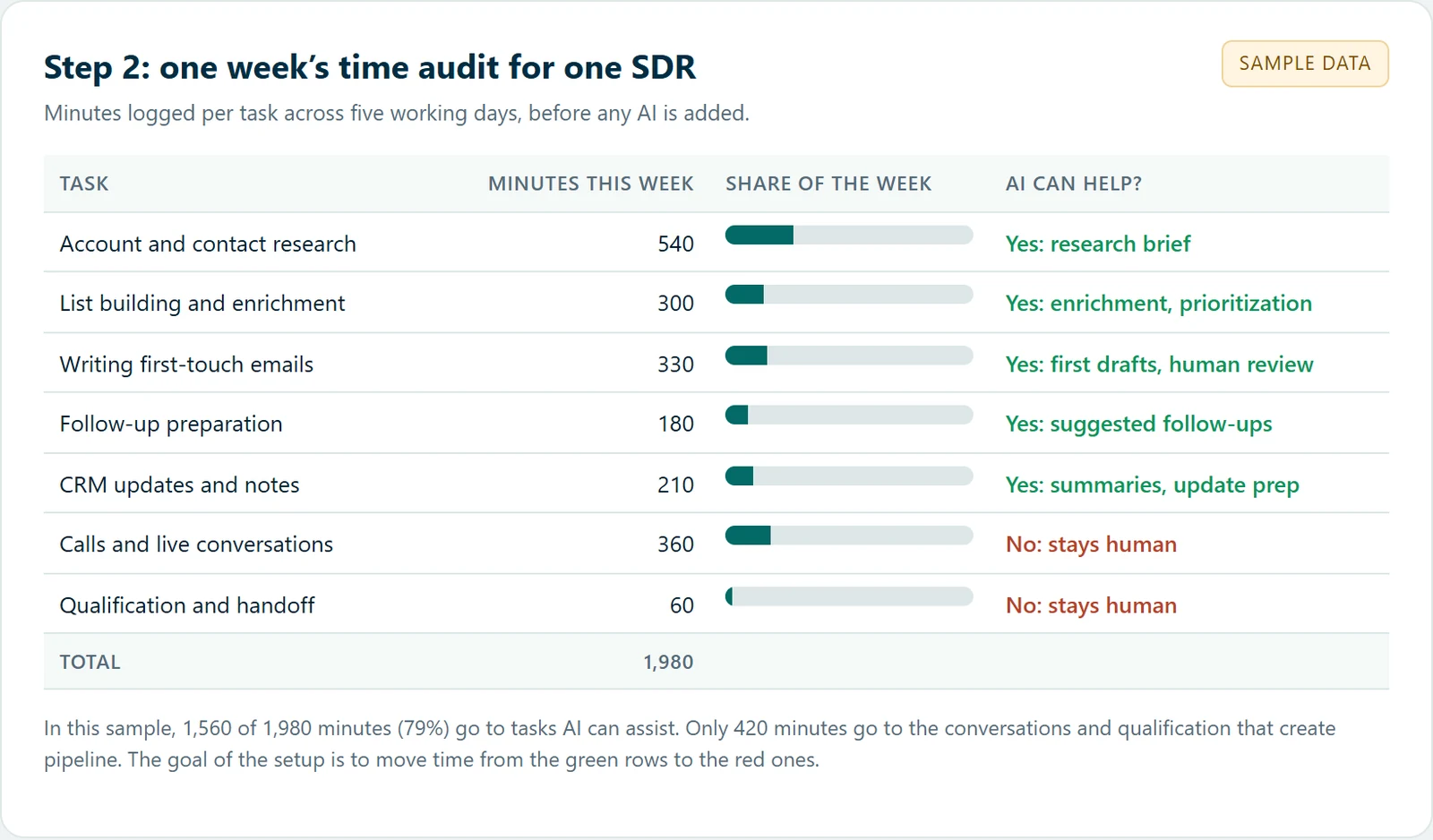
Step 3: Split each task between AI and the SDR
For every task in the audit, write down what AI prepares and what the SDR owns. Shobhit’s rule is to keep three things human whatever the tool:
“I would never completely delegate three things:
- Commercial judgment: Deciding whether an opportunity is genuinely qualified and worth pursuing.
- Human conversations: Cold calls, warm conversations, discovery, and objection handling where trust and contextual understanding matter.
- Relationship-building and deal progression: Engaging decision-makers, navigating buying committees, negotiations, and building confidence throughout the sales cycle.
AI should support these activities, but humans should remain accountable for the decisions and relationships.”
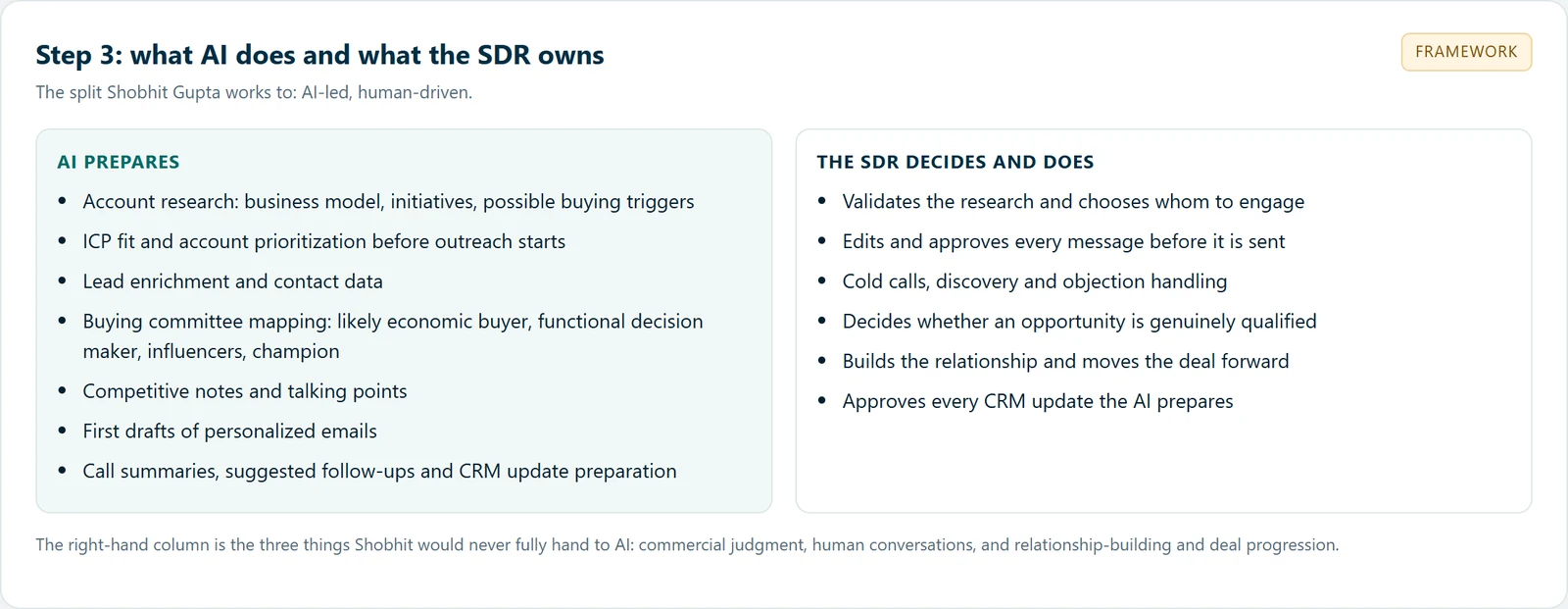
Agree the split with the SDR manager and write it into the SDR playbook, so every rep uses AI the same way and the results can be compared.
Step 4: Build the account research brief
Research is usually the largest block of time AI can shorten, and the output should be a short brief the SDR can check in a couple of minutes. Shobhit describes what it covers at GrowthStack:
“For example, when targeting an enterprise account, AI can help us identify relevant business initiatives, map possible use cases, and prioritize accounts before SDRs begin outreach.
For example, when targeting a mid-market or enterprise account, AI can help identify the likely economic buyer, functional decision-maker, influencers, and potential internal champions.
It can also help SDRs understand how a client’s product compares with competing solutions and prepare relevant talking points.
However, SDRs still need to validate the information and decide whom to engage.”
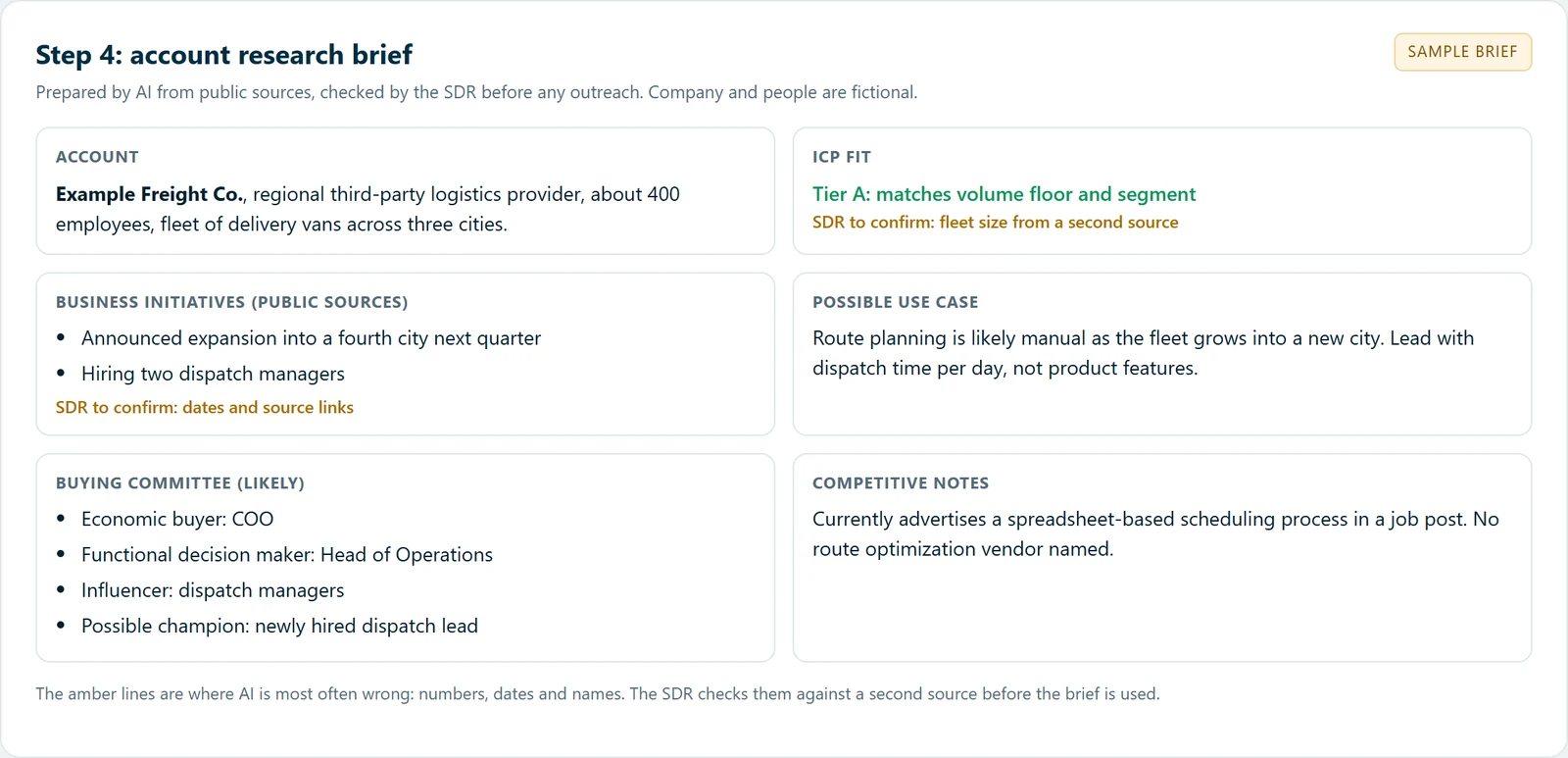
Keep the same fields for every account, so a manager can see at a glance which briefs were checked. The pilot kit has the template. When a brief shows a buying committee, the logistics buying committee guide shows how one maps out in practice.
The brief only helps if the AI is given enough to work from. Shobhit’s rule for prompting, with the example he uses most:
“You have to give a better context to get the best output. For example, I need a cold calling script for a company selling marketing services. First I give the context of what the marketing services are and what that company is capable of. Then the market I’m calling: the US, India, Europe or the Middle East. Then whom I’m going to call: the director of marketing or a marketing manager.
If you give that level of context, the output will definitely help, and it will save time as well.”
Step 5: Review every AI draft before it is sent
AI can draft a personalized first touch from the brief, but it should not send one. In Shobhit’s evaluations the drafts needed people throughout:
“AI SDRs need substantial context about the company, product, ICP, buyer personas, objections, positioning, and existing outreach scripts. Even after configuration, the messaging often requires continuous human review to maintain relevance and quality.”
Give the SDR a short checklist and make it a habit before every send: every fact about the prospect checked against a source, an opening about their business, one clear ask, and no unnecessary links. GrowthStack’s setup for first touches and sending volume, in his words:
“We prefer simple, personalized first-touch emails without unnecessary links, attachments, or images.”
And on volume, from his cold email infrastructure playbook:
“My preferred steady-state volume is 20–30 cold emails per mailbox per working day, provided deliverability and engagement remain healthy.”
The full eight-point checklist is in the pilot kit. What to check when replies drop is in the cold email deliverability checklist, and Google sets out what bulk senders must do in its email sender guidelines.
Step 6: Use AI for follow-up and CRM preparation
After a call, the admin is the other large block of time. Shobhit’s view of where AI fits:
“Today, AI can further support such workflows through call summaries, suggested follow-ups, lead prioritization, and CRM update preparation.”
Keep the SDR as the approver: AI prepares the summary and the update, and the rep confirms it before it reaches the CRM. Tools now build this into the CRM itself, such as Salesforce in Claude, which asks for approval before it writes back, and HubSpot’s Prospecting Agent. The connectors for HubSpot, Apollo and Outreach are covered in Claude for sales teams.
Step 7: Pilot it against your current process
Run AI-assisted prospecting on one segment and your current process on a comparable one, with the same ICP, sequences and reps, for at least four weeks. Track activity and replies weekly, but decide on meetings held and SQLs, because more activity on its own proves nothing. Shobhit puts it plainly:
“AI can help scale activities, but scaling activity doesn’t automatically generate qualified pipeline.”
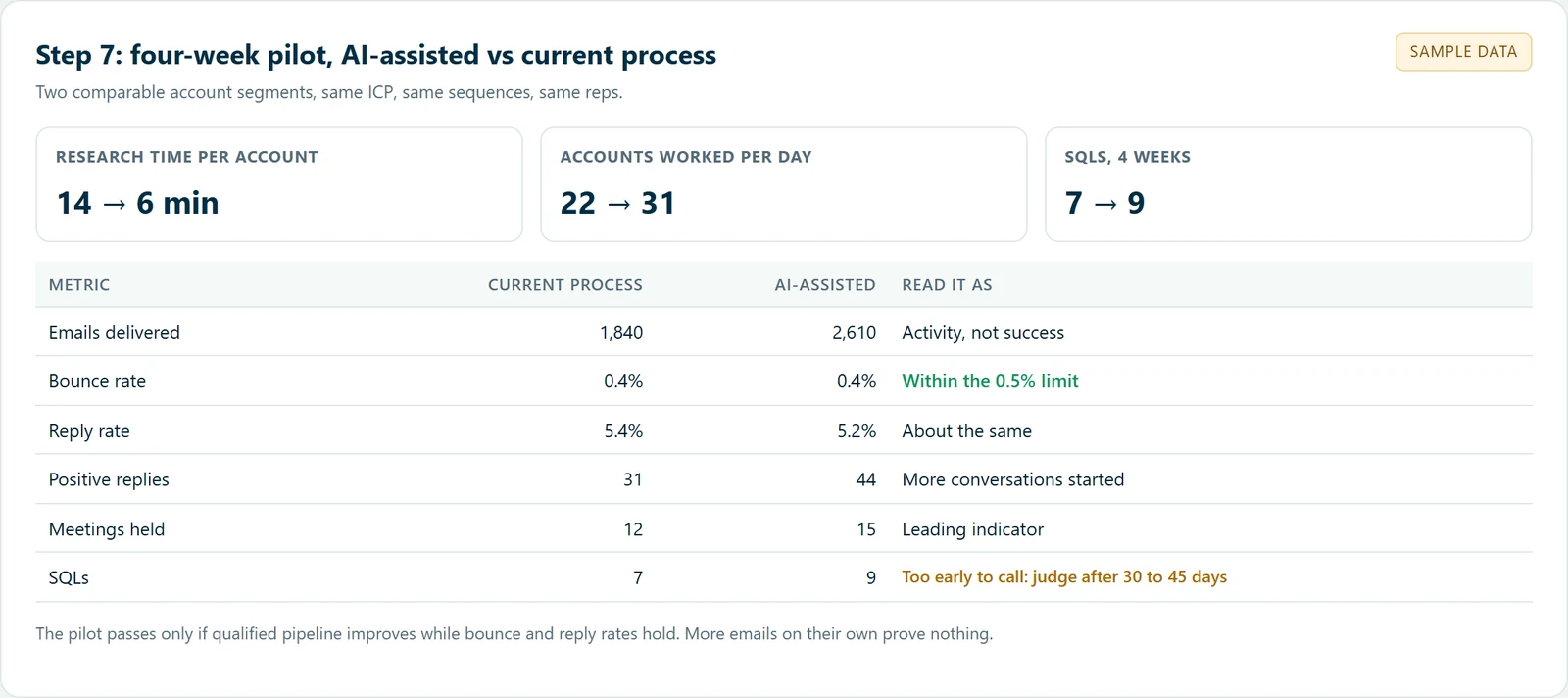
Messaging changes show up in days, but conversion changes need 30 to 45 days of activity before they can be judged. Keep the AI-assisted process only if qualified pipeline improves while bounce rate stays under 0.5% and reply rate above 5%. How to lay out the reporting is in how to build a GTM reporting dashboard.
What happened when Shobhit evaluated autonomous AI SDRs
Fully autonomous AI SDRs promise to run outreach end to end. Shobhit evaluated them when teams were scaling, hiring was slow, or SDR attrition had created capacity gaps:
“In my experience, fully autonomous AI SDRs often require more setup and oversight than expected, without consistently delivering qualified pipeline.
In the evaluations I’ve been involved in, I haven’t seen sufficiently consistent, verifiable qualified pipeline to justify replacing human SDRs with autonomous AI agents.
What has worked better is AI-assisted human selling.”
AI-driven calling ran into a different problem: in his experience, senior B2B decision makers were less receptive to robotic sales conversations, particularly when calls felt scripted. The full account, including the three problems he ran into, is in what evaluating AI SDRs showed.
On calls specifically, his rule is short:
“If you have to call senior decision makers, a human has to call, with the help of AI. AI can help you generate scripts, but you have to drive the conversation as a human.”
How much time does AI-assisted research save?
There is no reliable independent benchmark yet. Vendor pages give large figures without saying how they were measured: one puts research at 8 to 10 hours a week per rep with no source given (Outreach). The honest answer is to measure it on your own team: the time audit in step 2 gives the baseline, and the pilot in step 7 shows research minutes per account and accounts worked per day before and after.
The saving only matters if it moves. A rep who saves two hours of research and spends them sending more of the same message has gained nothing. A rep who spends them on calls and better-qualified conversations is the reason to do this at all.
For a small team with no sales ops
A two or three person team does not need an autonomous AI BDR or a complex stack. Shobhit’s advice to founders is to start with one person who uses AI well:
“I’d start with one capable, AI-enabled SDR who works closely with the founder. Together, they build the ICP, test channels, establish sequences, qualify opportunities, and create the initial playbook.
Once the sales motion starts showing repeatability, I’d introduce deeper automation, specialized AI agents, and additional SDR capacity based on actual pipeline requirements.”
For the tools, he leans toward one platform that combines prospecting data, enrichment, sequencing, calling and reporting, such as Apollo, because at that stage simplicity and speed matter more than a complex stack. The full reasoning is in AI BDR or first SDR and Outreach vs Salesloft, and Apollo’s own agents are covered in Apollo’s AI agents.
An example from GrowthStack’s client work
For an AI technology client, GrowthStack built an outbound engine around events. Shobhit gives it as an example of where AI-assisted research and messaging fit:
“In our AI technology client engagement, we designed an event-led outbound engine involving ICP segmentation, target-account research, email and LinkedIn sequences, and pre- and post-event follow-ups.
Rather than sending generic event invitations, the objective is to create relevant conversations with accounts that fit the client’s ICP.”
How event outreach is planned before, during and after a show is in event prospecting.
Download the pilot kit
The free kit follows the seven steps: a foundations checklist that tells you when you are ready, a one-week time audit, the task split, a research brief template, the eight-point review checklist, and a pilot tracker that compares the two segments and gives a verdict only when qualified pipeline improves within the bounce and reply limits. It opens in Excel and Google Sheets.
References
Related reading
Frequently asked questions
How can AI BDR tools streamline the SDR process?+
By taking over the preparation around each conversation: account research, ICP prioritization, lead enrichment, buying committee mapping, first drafts of personalized emails, call summaries, suggested follow-ups and CRM update preparation. The SDR keeps the decisions, the conversations, qualification and the relationship, and spends the time saved on more of those.
What time savings can SDRs expect from AI-assisted account research?+
There is no reliable independent benchmark, and vendor figures rarely say how they were measured. Measure your own: log one week of an SDR’s minutes by task before you start, then compare research minutes per account and accounts worked per day during a pilot. Judge the result on whether the time saved turns into qualified pipeline.
Should a small team buy an AI BDR or hire an SDR?+
Shobhit Gupta recommends hiring the first SDR, ideally one who uses AI for research, enrichment, prioritization, messaging and CRM admin. An autonomous AI BDR needs detailed context and supervision, and without a proven sales motion it automates an unproven one.
What should never be handed to AI in sales development?+
Commercial judgment about whether an opportunity is genuinely qualified, the human conversations themselves (cold calls, discovery and objection handling), and relationship-building and deal progression with decision makers and buying committees.
How do you know whether AI is helping your SDR team?+
Run a pilot on two comparable segments with the same ICP and sequences. Track activity weekly, but decide on meetings held and SQLs after 30 to 45 days, and only keep the AI-assisted process if qualified pipeline improves while bounce rate stays under 0.5% and reply rate above 5%.
Want AI set up inside your SDR process?
We check the foundations, set up research, drafting and CRM workflows in your existing tools, train the team on the review habits, and run the pilot with you. That is AI toolstack setup.
Book a Call